TL;DR: OpenAI Agents SDK gives you a small set of ready-made primitives — Agents, Handoffs, Guardrails, Sessions, Tracing — and gets a working agent running in under 50 lines of Python. LangGraph gives you a lower-level state graph — nodes, edges, typed state, checkpointers — and makes you decide the shape of the computation yourself. The decision that actually matters isn’t which is “better”; it’s whether your AI employee is a sequence of handoffs or a graph you need to control.
What’s the actual difference between OpenAI Agents SDK and LangGraph?
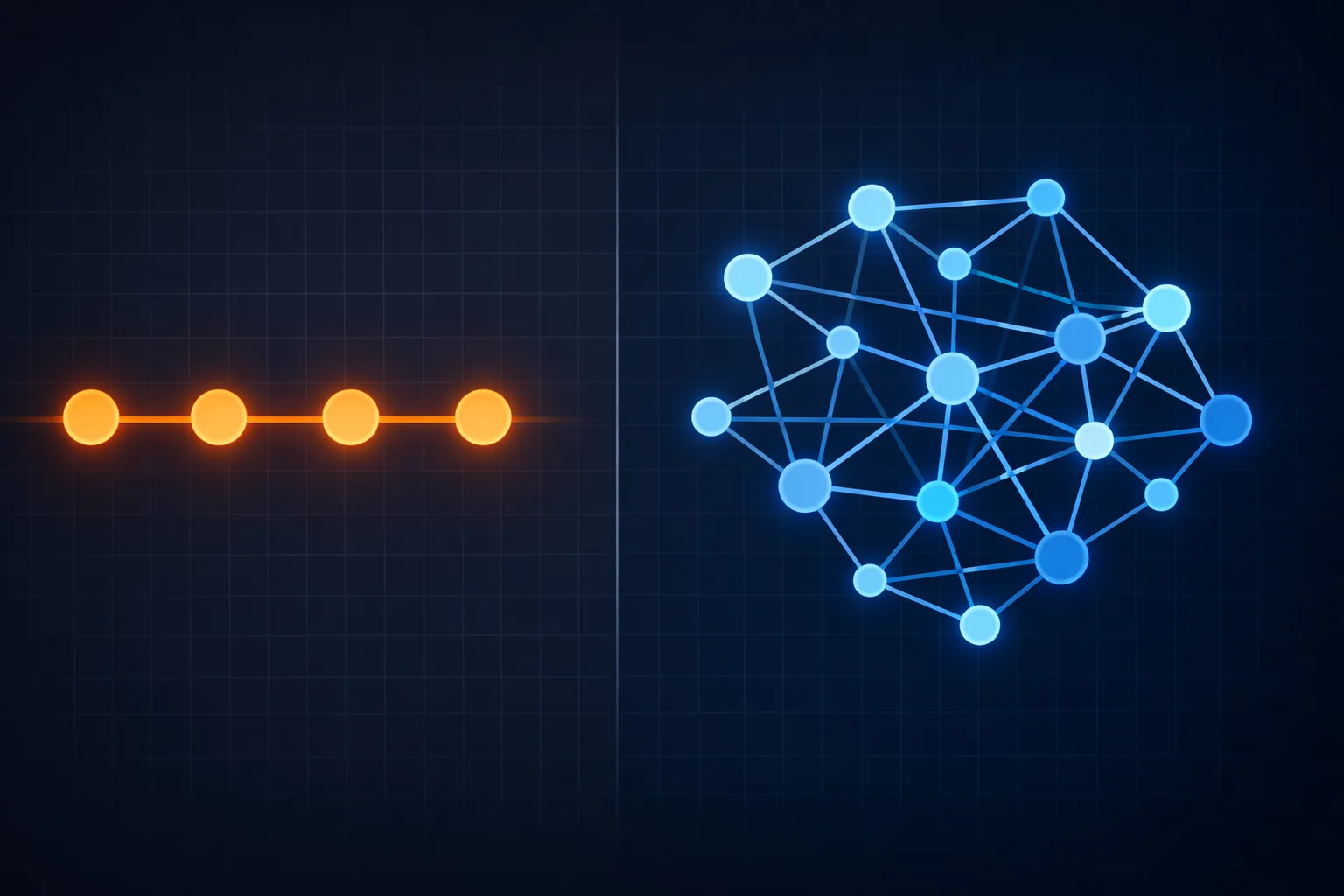
The two frameworks answer different questions. OpenAI Agents SDK answers “who is in charge right now?” — it models an agent as an LLM with instructions and tools that can hand control to another agent. LangGraph answers “what shape does this computation have?” — it models your workflow as a directed state graph where you define nodes, edges, and the typed state that flows between them.
That one distinction drives almost every other tradeoff you’ll hit. The Agents SDK is built around sequential handoffs: one agent transfers control to exactly one other agent, carrying conversation context with it. LangGraph is built around conditional routing: state moves through a graph, and edges decide where it goes next based on the current state — which can branch, loop, run nodes in parallel, or pause and wait for a human.
Here’s the thing to internalize early: neither is a “better” version of the other. They’re two different answers to two different problems, and picking wrong is usually a symptom of not having decided which problem you actually have. If you’re weighing this against the wider landscape, our LangChain vs CrewAI vs n8n platform comparison covers the other major contenders in the same space.
What are the core primitives of each framework?
OpenAI Agents SDK: four primitives, almost nothing else
Released in early 2025 as the production successor to the experimental Swarm project, the Agents SDK is deliberately small. Its primitives are:
- Agents — an LLM with a system prompt, a set of tools, and optional handoffs
- Handoffs — one agent delegates a task to another, passing along the conversation
- Guardrails — input/output validators that run as async checks, in parallel (fast) or blocking (fail-fast)
- Tracing — automatic logging of every LLM call, tool use, and handoff, viewable in a Traces dashboard
There’s a fifth thing worth naming: Sessions, which give you conversation memory. The SDK also ships a built-in agent loop — the machinery that calls a tool, feeds the result back to the model, and repeats until the agent produces a final answer or hits a turn limit. That loop being pre-built is a big part of why it’s fast to start with.
LangGraph: nodes, edges, state, and checkpoints
LangGraph (now at 1.x, MIT-licensed, from LangChain Inc.) is lower-level. Its primitives are:
- Nodes — units of work (a model call, a tool call, a function)
- Edges — transitions between nodes, including conditional edges that route based on state
- Typed state — a shared state schema that every node reads and writes, defined with reducers
- Checkpointers — a persistence layer that snapshots state at every node transition
- Interrupts — first-class human-in-the-loop, pausing a graph mid-run for approval
The checkpointer is the difference between a toy and something you can put on the internet. Because state is saved at every transition, a LangGraph workflow can crash and resume, pause on Monday and resume on Friday, or time-travel back to an earlier checkpoint and replay with a different prompt or model. It also cleanly separates short-term memory (the checkpointer, scoped to a single thread) from long-term memory (the Store, scoped across threads) — a two-level model that maps well onto how a real AI employee should remember “what just happened” versus “what we know about this customer.”
Which framework gets you to a working agent faster?
OpenAI Agents SDK, almost always. You can stand up a working agent in well under 50 lines of Python. The agent loop, tool calling, handoffs, and tracing are all handled for you. If you’ve used the OpenAI API, the mental model transfers directly.
LangGraph has a steeper climb because it asks you to think in graphs up front. You define the state schema, declare your nodes, wire your edges, and decide where the checkpointer lives. That’s not busywork — it’s exactly the control you’re paying for — but it means “hello world” is slower.
The honest framing: if your AI employee is a support triage flow or a content pipeline where one specialist hands off to the next, the Agents SDK’s default gets you to production faster. If your AI employee needs branching logic, loops, parallel fan-out, or a human approval gate in the middle, LangGraph’s graph is the tool that makes those expressible at all. This is the same tension you’ll feel in the broader no-code vs code decision for AI agents — speed to first working thing versus control over its shape.
Does the OpenAI Agents SDK lock you into OpenAI models?
No — and this is the most commonly repeated misconception. Despite the name, the Agents SDK is provider-agnostic. It’s optimized for OpenAI models and the Responses API, but the official docs ship first-party guides for Anthropic Claude, Google Gemini, and any OpenAI-compatible endpoint, with support for 100+ models via the Chat Completions API and a LiteLLM integration layer.
There’s a real caveat buried in that reassurance, though. Some features — hosted tools like web search and file search, and certain structured-output behavior — require the Responses API and don’t work on non-OpenAI backends. So the model is a deployment detail, not an architectural commitment, but the fully featured path is OpenAI-flavored. If your AI employees need to run on a specific non-OpenAI model with every bell and whistle, test that path early rather than assuming it.
LangGraph is genuinely model-agnostic by construction. It orchestrates whatever model you point it at and doesn’t care which provider serves it. If multi-model freedom is a hard requirement — say, you want one agent on Claude and another on Gemini inside the same workflow — LangGraph gives you that without friction.
OpenAI Agents SDK vs LangGraph: the comparison table
| Dimension | OpenAI Agents SDK | LangGraph |
|---|---|---|
| Mental model | Agents + handoffs (who’s in charge?) | State graph (what shape is the compute?) |
| Core primitives | Agents, Handoffs, Guardrails, Tracing, Sessions | Nodes, Edges, Typed state, Checkpointers, Interrupts |
| Control flow | Sequential handoffs, one-to-one | Branching, looping, parallel fan-out, conditional edges |
| Persistence | Sessions (conversation memory) | Checkpointers + Store (durable state, time travel, crash recovery) |
| Human-in-the-loop | Guardrails gate inputs/outputs | First-class interrupt() — pause mid-graph, approve, resume |
| Model lock-in | Provider-agnostic, OpenAI-optimized | Fully model-agnostic |
| Tracing/observability | Built-in, on by default | Via LangSmith (integrates out of the box) |
| Time to first agent | Fast (under ~50 lines) | Slower (design the graph first) |
| Best fit | Sequential handoff patterns: triage, support tiers, pipelines | Complex topologies: branching workflows, approvals, regulated audit trails |
Read the table down the middle, not across it. The SDK’s guardrails will validate an input or output and halt on failure. LangGraph’s interrupts will pause a workflow in the middle of a multi-step task and wait for a human to say “approve” before a destructive action fires. Those are different safety mechanisms solving different problems.
When should you choose OpenAI Agents SDK?
Choose it when your AI employee’s job is delegation in a straight line. Support tiers where a generalist triages and hands off to a billing specialist, who hands off to a refund specialist. Content pipelines where a researcher hands off to a writer. Anything where the flow is “agent A decides agent B should take over.”
You’ll also reach for it when you want observability without setup. Tracing is on by default, which means the moment your agent misbehaves in production, you can see exactly which tool call went sideways. That’s a real operational advantage for a small team without a dedicated platform engineer.
And you’ll reach for it when speed matters. If the goal is to validate an AI employee concept this sprint and refine later, the Agents SDK’s pre-built loop and minimal surface area get you a real conversation faster than anything else in this comparison.
When should you choose LangGraph?
Choose it when your AI employee’s job is a workflow with a shape. Anything that branches, loops, or runs steps in parallel. A research agent that fans out to five sources and merges. An approval flow where a draft must pause until a human signs off. A cyclical process that revisits earlier steps based on output.
Choose it when durability is non-negotiable. If your AI employee is doing work where a crash or a restart can’t mean starting over — regulated industries, audit trails, long-running multi-hour jobs — the checkpointer is the feature that saves you. Your process can die at 2 a.m. and resume from the exact node it was on, not from the beginning.
Choose it when you need precise control over routing. LangGraph’s conditional edges are the routing primitive; they let you express “if the research is inconclusive, loop back to the researcher; if it’s done, move to the writer.” That kind of explicit control-flow is awkward to jam into a handoff model.
And choose it when multi-model is a hard requirement — one agent on Claude, another on Gemini, inside one graph.
What does the “orchestration vs delegation” framing really mean?
This is the cleanest way to hold the two in your head at once.
Delegation (the Agents SDK) assumes a chain of custody. Control moves from one agent to the next. Each handoff is a single, atomic transfer. The framework’s job is to make that transfer reliable and observable.
Orchestration (LangGraph) assumes a topology. You are the one deciding what runs when, what branches exist, and where a pause belongs. The framework’s job is to execute that topology faithfully and remember its state.
Neither is more “advanced.” A well-designed handoff chain can be elegant and robust; a poorly-designed graph is just a tangle. The question is whether your AI employee’s work is better expressed as a chain of custody or a shape you control. Most real AI employees are some of both — which is why this decision is genuinely consequential and worth getting right the first time. It’s also worth deciding early whether your agent should be fully autonomous or assisted by a human at key steps — that answer changes how much you lean on either framework’s safety primitives.
Is there a third option this comparison can’t score?
Yes — and it’s the honest thing to name before you pick either.
Both of these are frameworks you assemble. They give you primitives, but you’re still the one wiring agents to your own data, building authentication and sync, standing up the checkpointer or the tracing backend, and maintaining the whole thing as a system. That’s the DIY path, and if what you want is the depth and control of hand-rolling it, both frameworks serve you well. The same is true of the code you write to connect them to the world — how your agent actually connects to the systems around it via webhooks and APIs is where most production pain lives, and it’s work neither framework does for you.
Disclosure: we build one of these. Our platform, EmployAIQ, is an AI-workforce platform where you hire AI Employees — agents that come with a role, memory, supervision, and an audit trail already built — rather than assembling them from primitives. It’s the wrong choice if you want to own the skill and the plumbing yourself. It’s the right category to consider if you want the outcome of an AI employee without becoming the person who maintains the framework, the checkpointer, and the tracing stack. The honest category line: n8n is a toolkit you assemble; EmployAIQ is employees you hire. Neither is a better version of the other — they answer different questions.
Frequently asked questions
Is LangGraph harder to learn than the OpenAI Agents SDK?
Yes, in the same way a manual transmission is harder than an automatic. LangGraph asks you to reason about state, edges, and checkpoints explicitly, so the learning curve is steeper — but that’s the control you’re buying. The Agents SDK gets you productive faster because it makes more decisions for you.
Can I use OpenAI Agents SDK with Claude or Gemini?
Yes. It’s provider-agnostic and ships first-party guides for Anthropic and Google models. Just verify early that the specific features you need (hosted tools, structured outputs) work on your chosen non-OpenAI backend, since some require the Responses API. If your AI employees already live in a no-code automation stack, check whether agents can run directly inside Zapier before introducing a Python framework.
Do I need LangChain to use LangGraph?
No. LangGraph is a standalone library. You don’t need LangChain chains or LCEL to build with it, though they integrate smoothly if you already use them.
Which is better for production AI employees?
Neither is categorically better — it depends on your topology. Sequential handoff flows ship faster on the Agents SDK. Branching, looping, parallel, or human-approval workflows are more expressive and durable on LangGraph. Match the framework to the shape of the work, not the other way around.
Do either of these lock me in?
LangGraph locks you into a way of thinking (graphs), not a vendor. The Agents SDK locks you into an opinionated API design, not a model provider. Both are open source and MIT-licensed, so lock-in risk is lower than a managed SaaS platform — and higher than hiring the outcome outright.
Want to design AI employee roles from scratch rather than deploy templates? The AI Agent Architects runs as a small five-week cohort, and the waitlist hears every enrolment date first: Join the AI Agent Architects waitlist
About the Author
Anthony Odole is a former IBM Senior Managing Consultant, where he served as Enterprise Architect on Fortune 500 engagements, and the founder of AIToken Labs. He helps business owners cut through AI hype by focusing on practical systems that solve real operational problems.
His flagship platform, EmployAIQ, is an AI Workforce platform that enables businesses to design, train, and deploy AI Employees — AI agents that function as digital workforce members — that perform real work without adding headcount.